

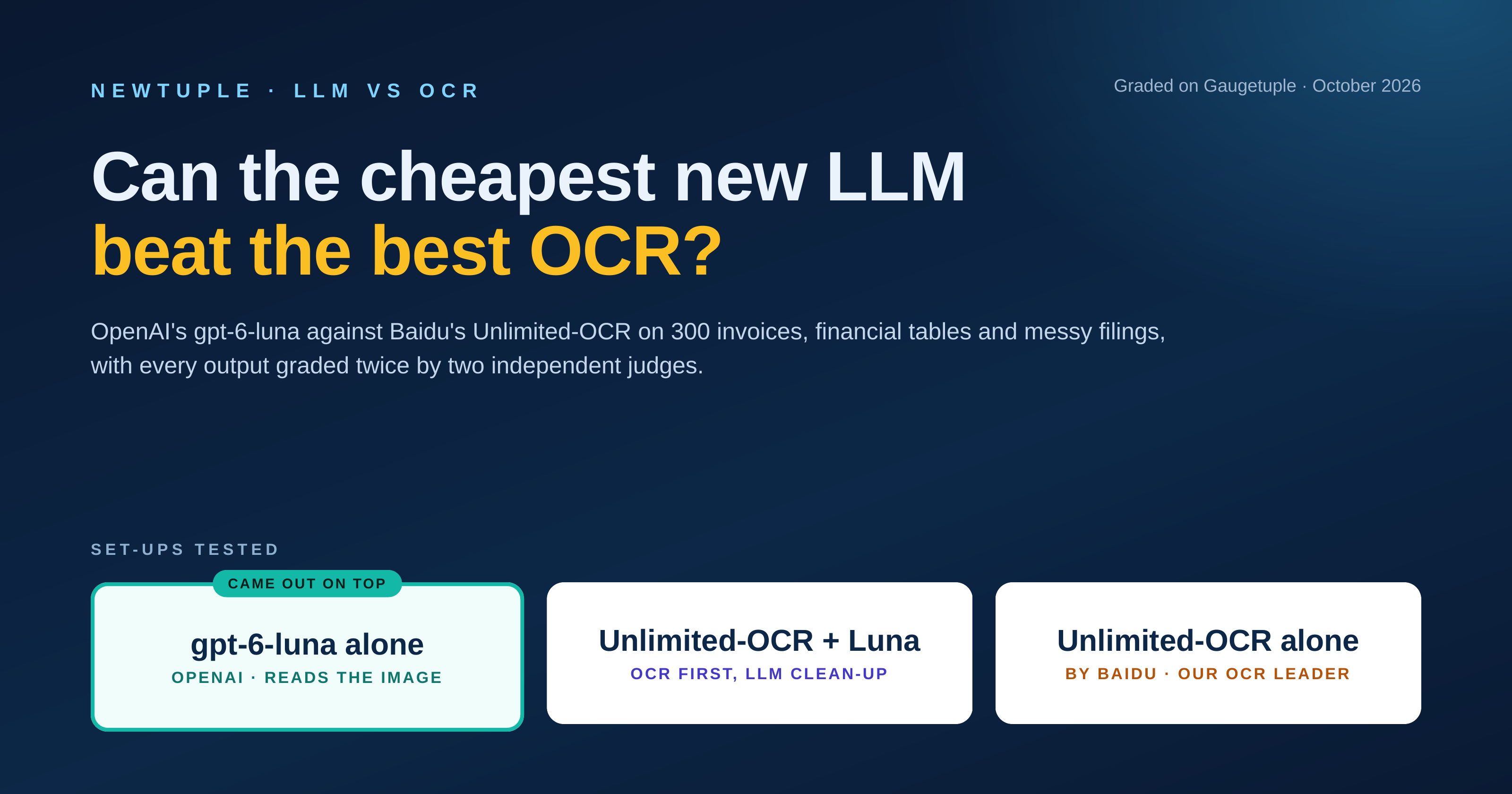
We put OpenAI's cheapest model against the OCR engine that topped our 2026 benchmark, on the same 300 pages, and had every result graded twice. See the scores, the cost per 1,000 pages, the latency, and what we would deploy today.
Introduction
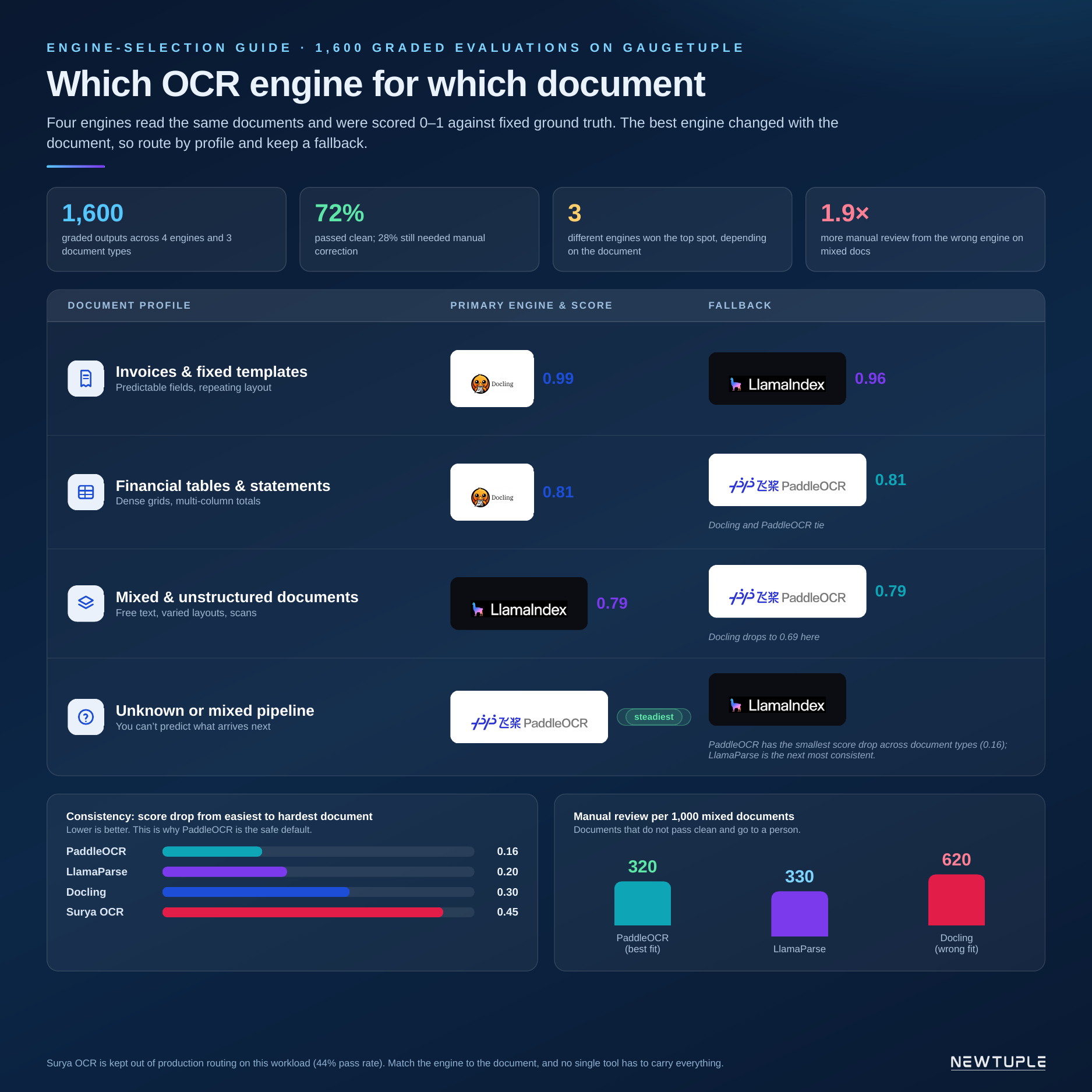
In October we updated our OCR benchmark, and Baidu's Unlimited-OCR came first on every document type we tested. A few days later a reader asked us a fair question on LinkedIn: if the new multimodal models can read a page image directly, why run a separate OCR step at all?
We had asked a version of that question before. In 2023 we put GPT-4V against AWS Textract in LLMs vs. Cloud OCR, and the model already held its own at a fraction of the price. Three years on, the models are cheaper again and the best open OCR engines are much better, so we ran the test properly this time, on the same pages and correct answers as our OCR benchmark and with every output graded on Gaugetuple.
A summary of what we found
The cheapest model OpenAI sells today, gpt-6-luna, reading the page image on its own, scored higher than Unlimited-OCR, passed more pages and cost about a quarter as much to run. The gap was widest on dense financial tables, where the OCR engine often read the numbers correctly and then split them away from their row labels. On clean invoices all three set-ups were close to perfect, so there was nothing to choose between them.
| 0.984 Luna average score (OCR 0.967) | 98.7% Luna pages passed (OCR 96.3%) | $1.08 Luna cost per 1,000 pages (OCR ~$4.40) | 10s Luna typical time per page (OCR 21s) |
|---|
Scores from the second judge, gpt-6-sol. The first judge, GPT-5, ranked the set-ups the same way.
| What the evidence supports For the documents we tested, a separate OCR step no longer earns its place in front of a cheap multimodal model. Running the OCR first and asking Luna to clean up its text did not help either, because the model can only work with what the OCR gave it. |
|---|
01 · THE QUESTION
Is OCR still the first step?
For most of the document pipelines we have built, OCR came first and everything else depended on how well it read the page. The model at the end of the chain answered from whatever text the OCR handed it, so a table that came apart at the OCR step stayed broken all the way through.
That made the choice of OCR engine one of the most important decisions in the pipeline, and it is why we benchmark them. What changed this year is that the cheapest tier of multimodal models dropped to about ten cents per million input tokens, which made us want to know whether the cheap model could do the OCR engine's job outright, or at least tidy up after it.
So we tested three set-ups on the same pages:
| Set-up | How it works | What we wanted to learn |
|---|---|---|
| gpt-6-luna alone | The model reads the page image and writes out everything on it, with tables as Markdown | Can the cheapest model replace the OCR engine? |
| Unlimited-OCR + Luna | Unlimited-OCR reads the page, then Luna cleans up its text and removes headers, page numbers and placeholders | Does a cheap model improve a top OCR engine? |
| Unlimited-OCR alone | Baidu's open 3-billion-parameter OCR model on one NVIDIA L4 GPU | The baseline from our October benchmark |
02 · HOW WE TESTED
Same pages, same answers, two judges
We reused the exact pages and correct answers from our October OCR benchmark, which means the new results sit on the same scale as the five engines we published then.
- Documents: 100 invoices, 100 dense financial tables from FinTabNet, and 100 real SEC filings from OHR-Bench that mix text, tables, headers and footers on one page.
- Volume: 300 pages per set-up, 900 outputs in total, each graded twice, which makes 1,800 grades.
- First judge: GPT-5 on Gaugetuple, with the same grading instructions we used for the October benchmark. Each output gets a score from 0 to 1, a verdict and an error tag.
- Second judge: gpt-6-sol, a newer and independent OpenAI model, with exactly the same instructions. We added it because a GPT model grading a GPT model is the first thing a careful reader would question.
- Pass: an output passes when the judge grades it good or excellent, a score of 0.75 or more.
- Significance: we compared the set-ups page by page and used bootstrap resampling to separate real gaps from noise.
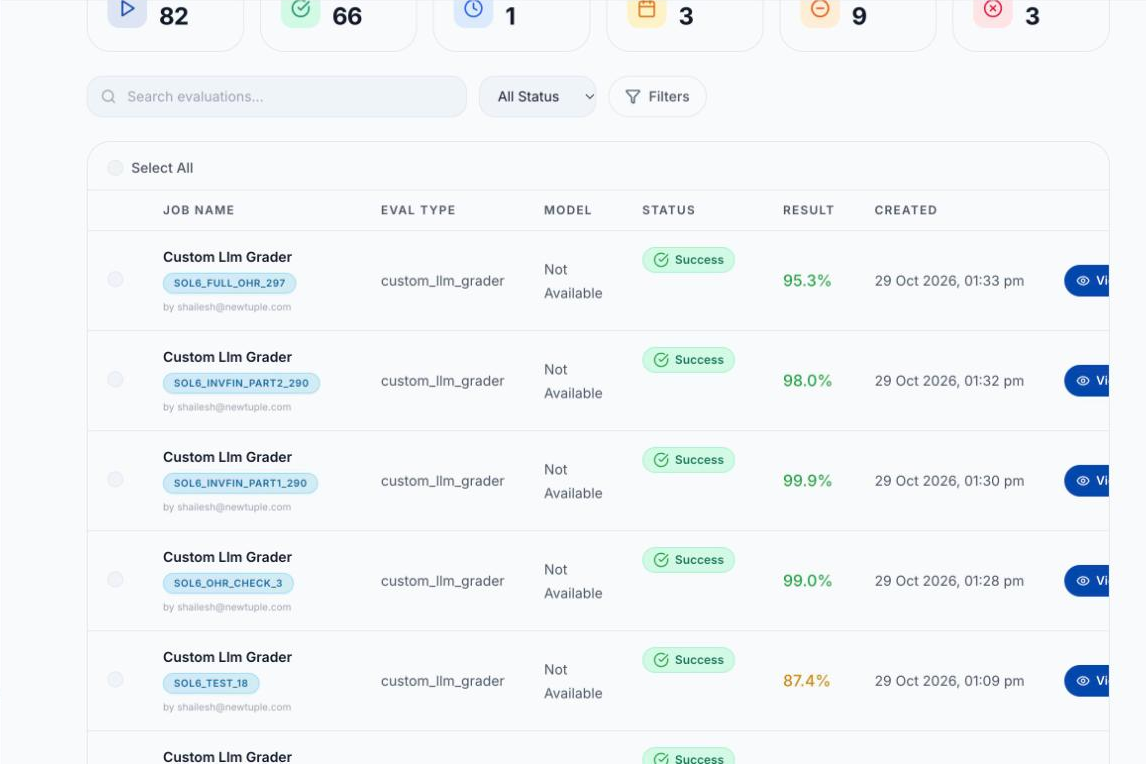 Gaugetuple evaluation runs for the LLM vs OCR test
The gpt-6-sol grading runs in Gaugetuple. We checked each set-up on a few rows first, then graded the rest in three files, so no output was paid for twice.
03 · RESULTS
Finding 1: The cheap model holds up as the documents get harder
Every OCR engine in our benchmark lost ground as the pages got harder, from clean invoices to dense tables to messy filings. Here are the three new set-ups against the June engines, all graded by the same GPT-5 judge on the same pages.
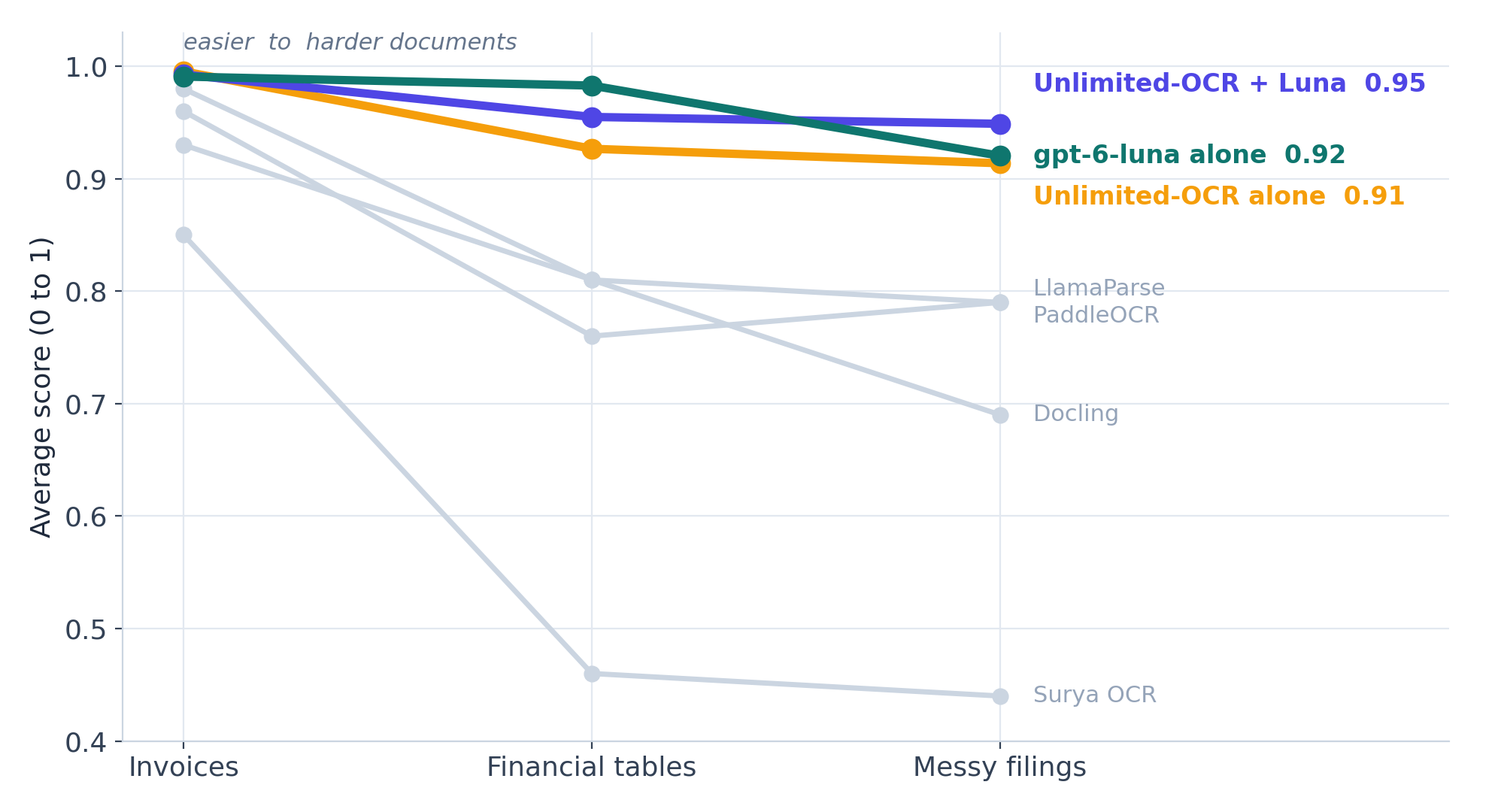 Average score from easier to harder documents: gpt-6-luna, Unlimited-OCR and Unlimited-OCR + Luna against the June OCR engines
The June engines (grey) slide steeply on financial tables and messy filings. Luna (teal) holds 0.98 on financial tables, where the best June engine reached 0.81. On messy filings the three new set-ups sit within a few points of each other.
The second judge gave the same order and was a little more generous across the board:
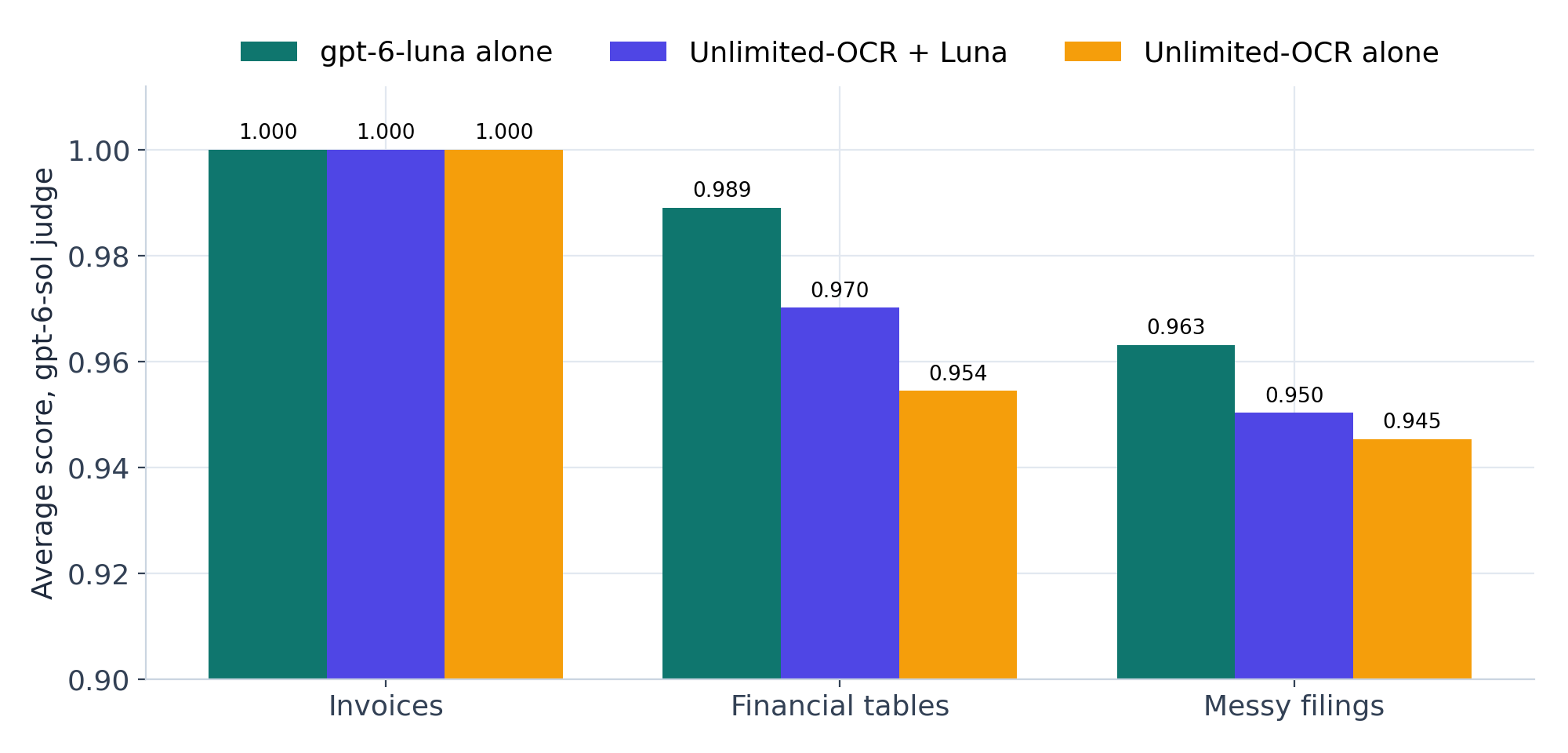 Average score by document type under the gpt-6-sol judge
All three set-ups scored a perfect 1.000 on invoices. Luna leads on financial tables (0.989) and on messy filings (0.963).
| Set-up | Invoices | Financial tables | Messy filings | Overall | Pages passed | Failed pages |
|---|---|---|---|---|---|---|
| gpt-6-luna alone | 1.000 | 0.989 | 0.963 | 0.984 | 98.7% | 4 |
| Unlimited-OCR + Luna | 1.000 | 0.970 | 0.950 | 0.973 | 96.7% | 10 |
| Unlimited-OCR alone | 1.000 | 0.954 | 0.945 | 0.967 | 96.3% | 11 |
gpt-6-sol judge. Under GPT-5 the overall scores were 0.965, 0.965 and 0.945, and the failed pages were 5, 12 and 19.
The financial-table gap is the one that holds up under every check we ran. Luna's lead over the OCR engine there is +0.035 with the second judge and +0.056 with the first, and in both cases it is well outside the noise. On messy filings the gap is small enough that we call it a tie, and on invoices there is no gap at all.
| The practical reading If your documents are clean invoices, any of these set-ups will do and you should pick on cost and convenience. The moment your pages carry dense tables, the model reading the image directly keeps the rows and columns together far more often than the OCR engine does. |
|---|
04 · SECOND OPINION
Finding 2: Two judges, one ranking
We ran the second judge because we expected someone to ask whether GPT-5 simply likes the output of another GPT model. gpt-6-sol came back slightly more lenient, by about 0.02 on average, and mostly on borderline pages where a column was missing or a table had been flattened. It flagged the same problems as GPT-5 and took fewer points off for them.
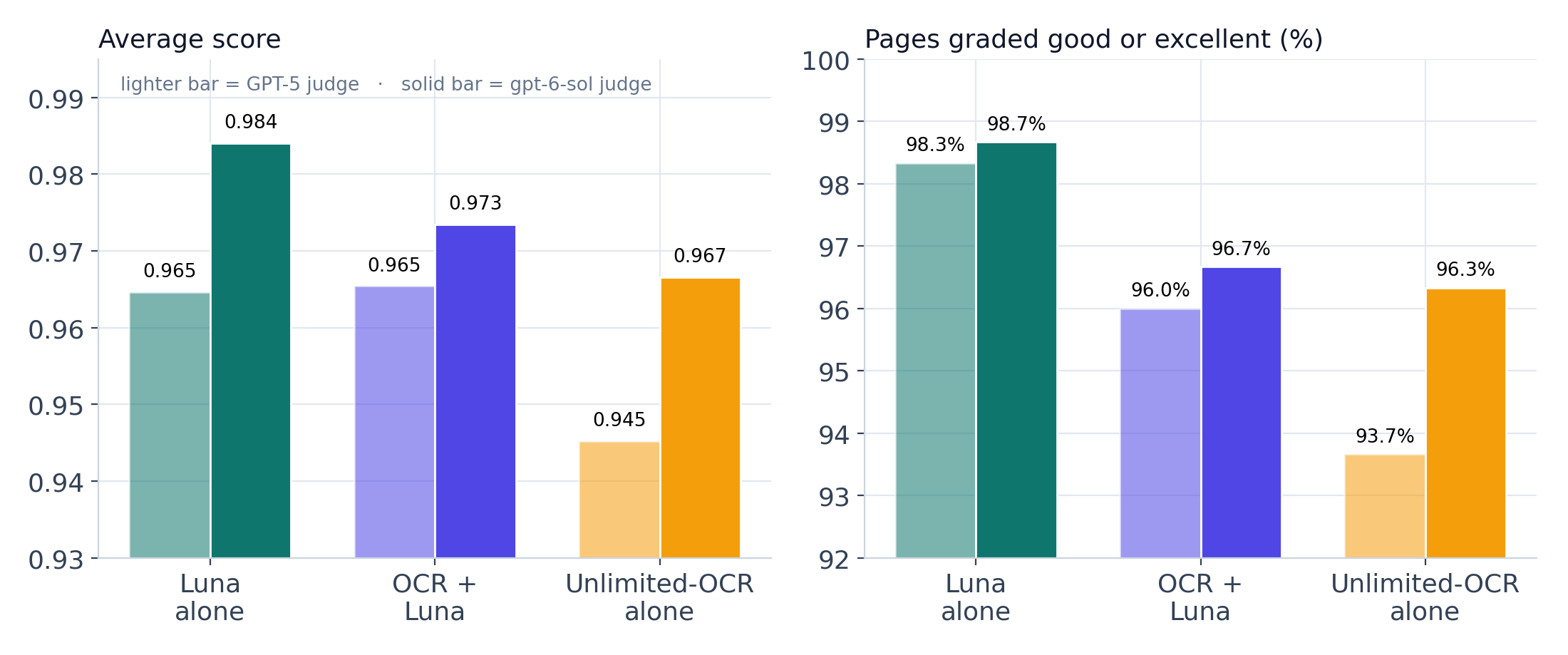 Average score and pass rate for each set-up under both judges
Lighter bars are GPT-5, solid bars are gpt-6-sol. Luna comes out on top under both.
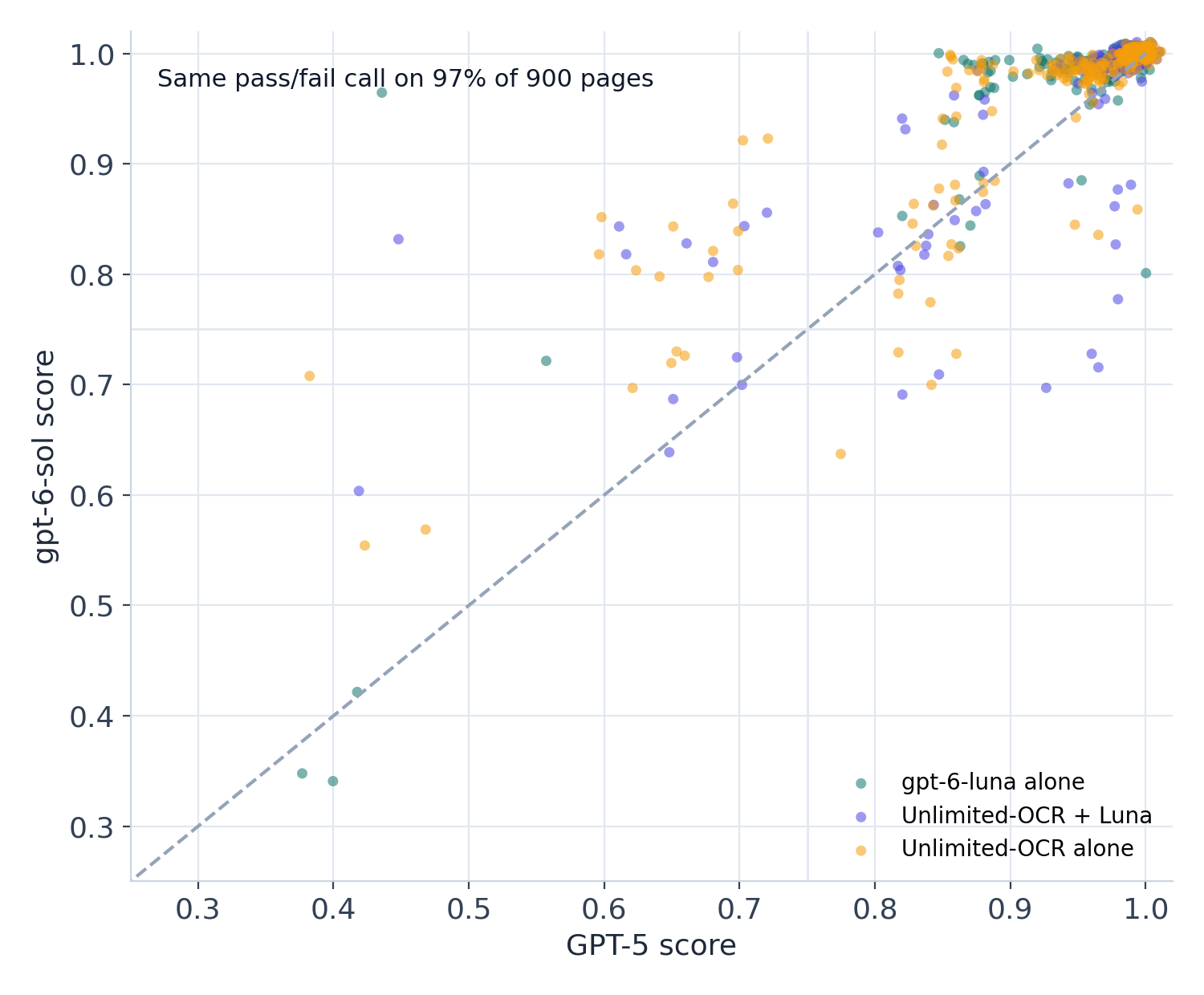 Per-page scores from GPT-5 against gpt-6-sol
Each dot is one page. The two judges made the same pass or fail call on 97% of the 900 pages, and the pages they both failed are the same handful of genuinely broken outputs.
One finding did change between the judges. GPT-5 rated Unlimited-OCR + Luna highest on messy filings, and gpt-6-sol rated Luna alone highest there. Neither gap is large enough to be sure of, so we don't claim a winner on messy filings, and we'd treat any single-judge result on a close race with the same caution.
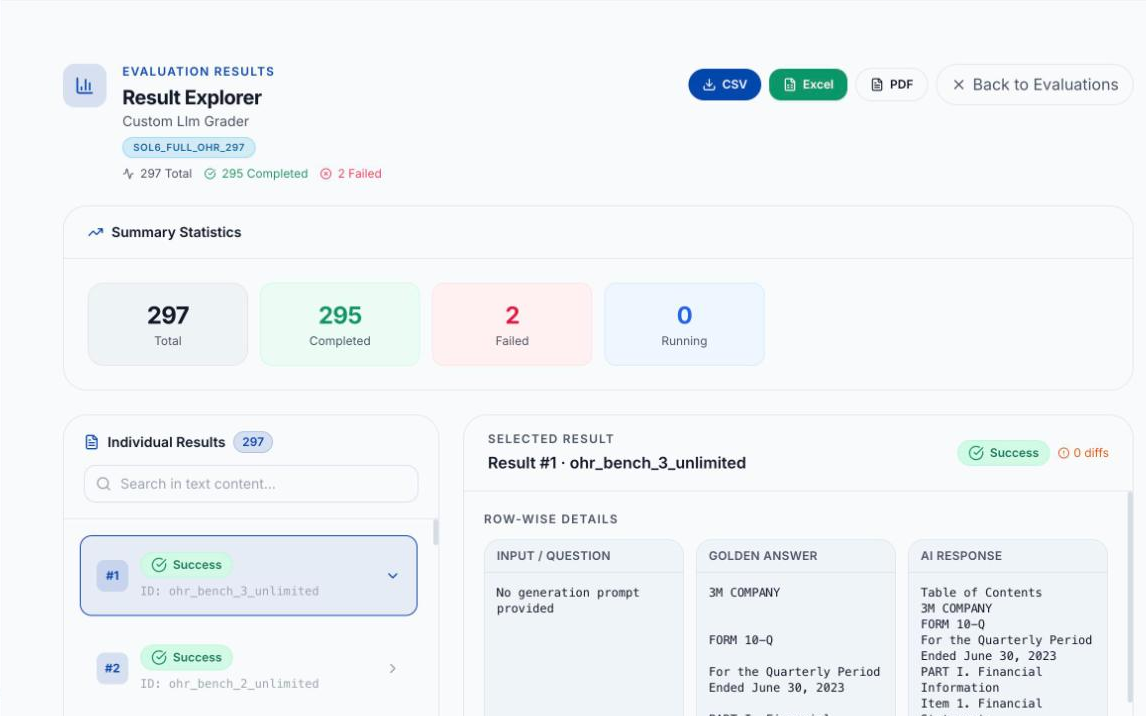 Gaugetuple Result Explorer for the gpt-6-sol run on 297 SEC filing pages
The second judge's run on the messy filings: 297 outputs graded, with every row carrying the engine output, the correct answer, a score and the judge's reasoning. The two rows marked failed are both Luna pages that stopped early.
05 · FAILURE PATTERNS
Finding 3: Each set-up fails in its own way
Because the judge tags an error type on every flawed output, we can see how each set-up breaks as well as how often.
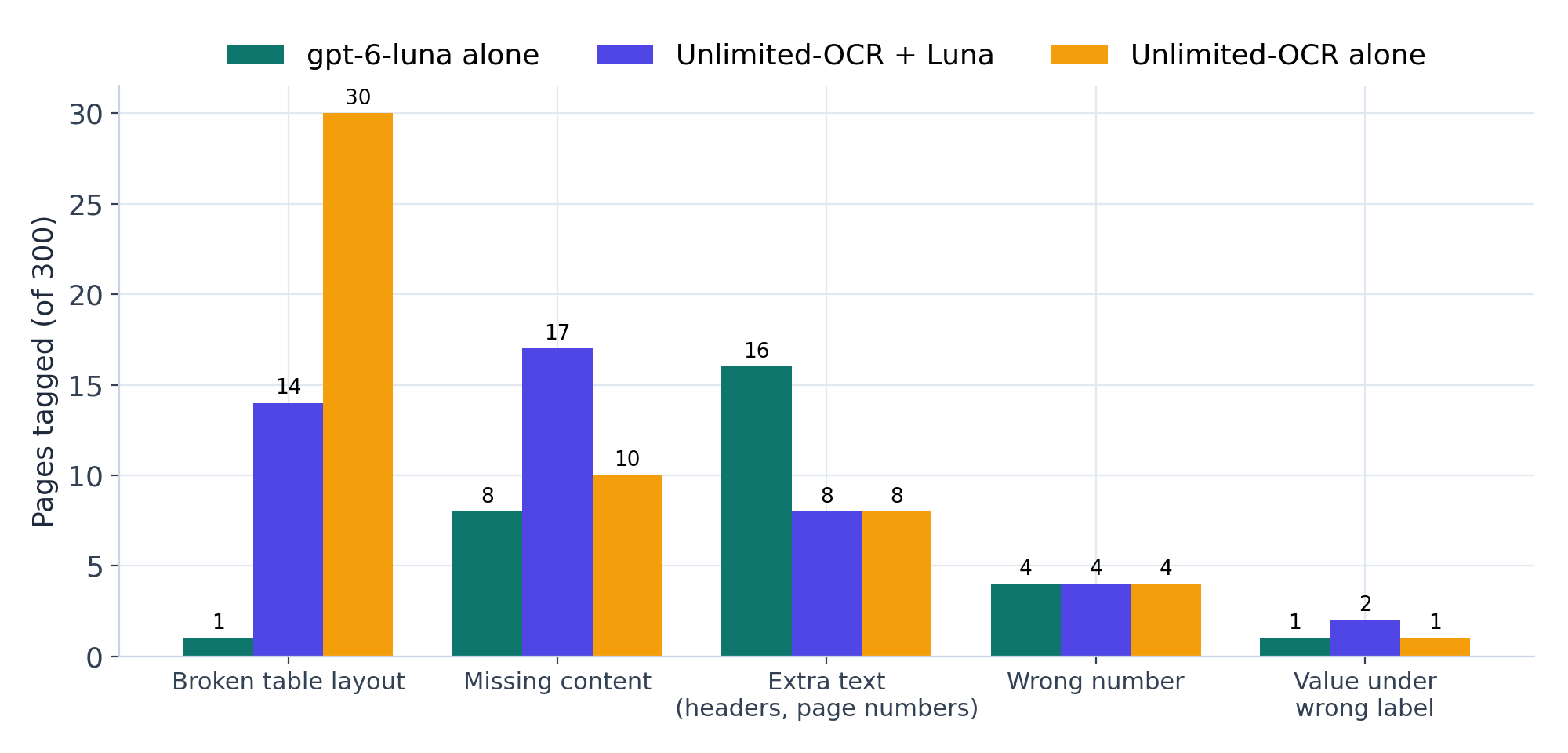 Error tags by set-up under the gpt-6-sol judge
Unlimited-OCR broke the table layout on 30 pages and Luna on 1. Luna's most common tag is extra page text such as running headers and page numbers, which it copies faithfully from the page.
- gpt-6-luna alone keeps tables intact. All four of its failed pages were long, dense filings or tables where it stopped early and left content out, which is easy to catch with a check on output length.
- Unlimited-OCR alone is perfect on invoices. On dense tables it often reads every value correctly and then separates the values from their row labels, which is the hardest kind of error to spot downstream.
- Unlimited-OCR + Luna strips page clutter well, but it can only work with the OCR's text and has no way to repair a table the OCR already broke. Six of its ten failed pages are pages the OCR also failed, and it had the most missing content of the three.
Here is one financial table from the test, graded by gpt-6-sol, read by the OCR engine on the left and by Luna on the right.
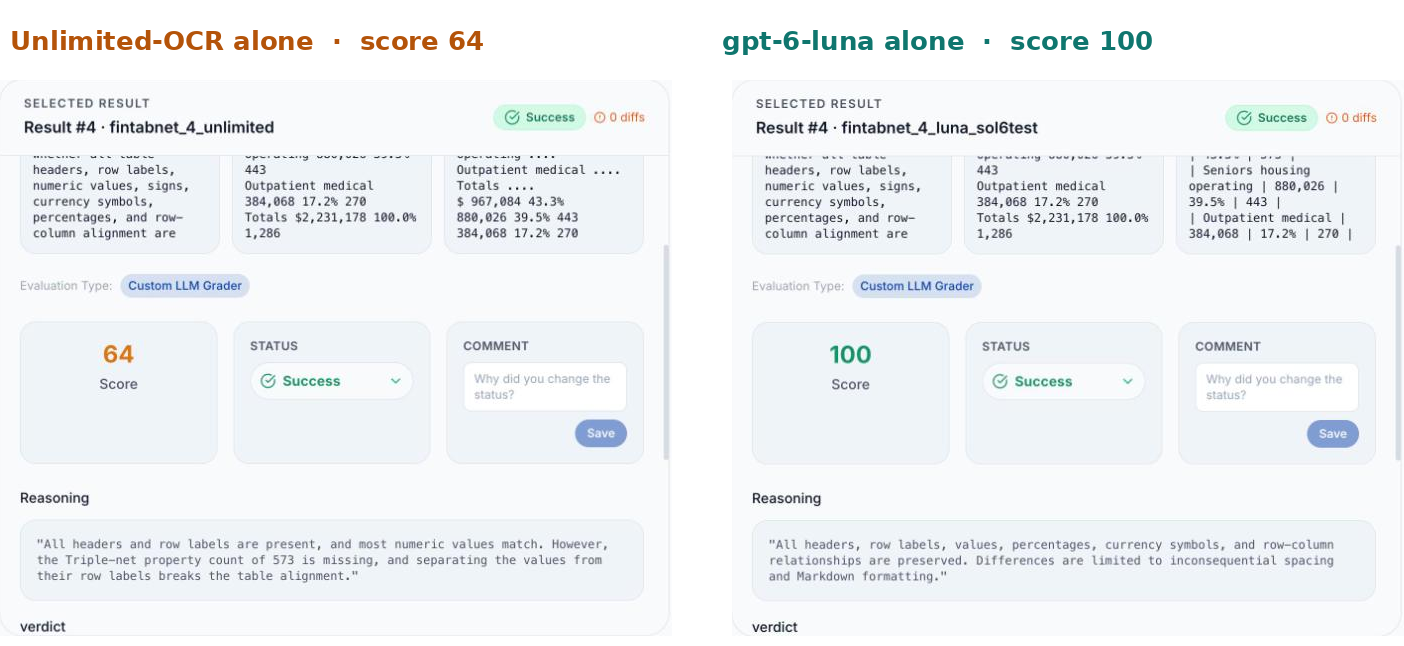 The same financial table in Gaugetuple: Unlimited-OCR scored 64, gpt-6-luna scored 100
Unlimited-OCR read the labels and most of the values, then printed the numbers as a separate block and dropped one count, so the judge scored it 64. Luna kept every value in its row and scored 100.
Luna's misses look different, and the judge's note makes the cause easy to spot.
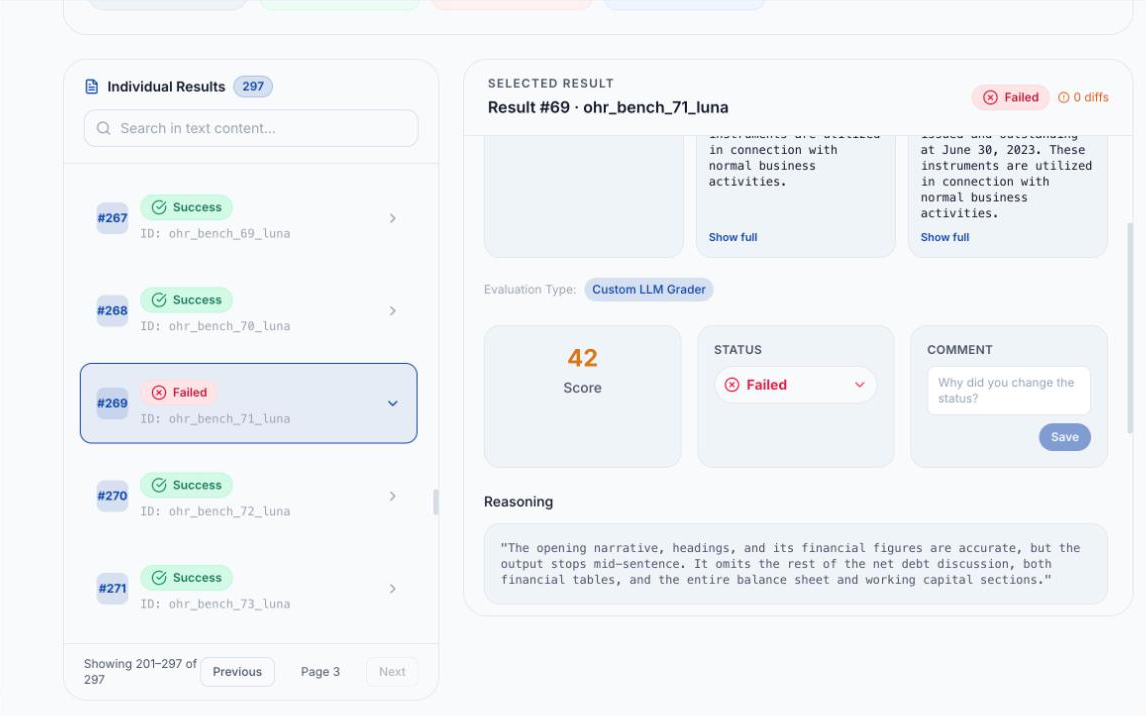 A failed Luna page in Gaugetuple, scored 42, where the output stops mid-sentence
One of Luna's four failed pages: everything it wrote was correct, but it stopped mid-sentence on a long filing and left out the rest of the page. A check on output length catches this before it reaches anyone.
| Why the extra step didn't help A cheap model reading OCR text sees a flat string where the table used to be, so it cannot recover which number belonged to which row. Reading the image directly gives the model the layout, and that is where Luna gains most. |
|---|
06 · COST
Finding 4: The best set-up is also the cheapest
In 2023, reading 1,000 pages with GPT-4V cost us about $13 to $14, against about $70 with every AWS Textract feature switched on, a price AWS still lists today. Today gpt-6-luna does it for $1.08, and Unlimited-OCR costs about $4.40 in GPU time.
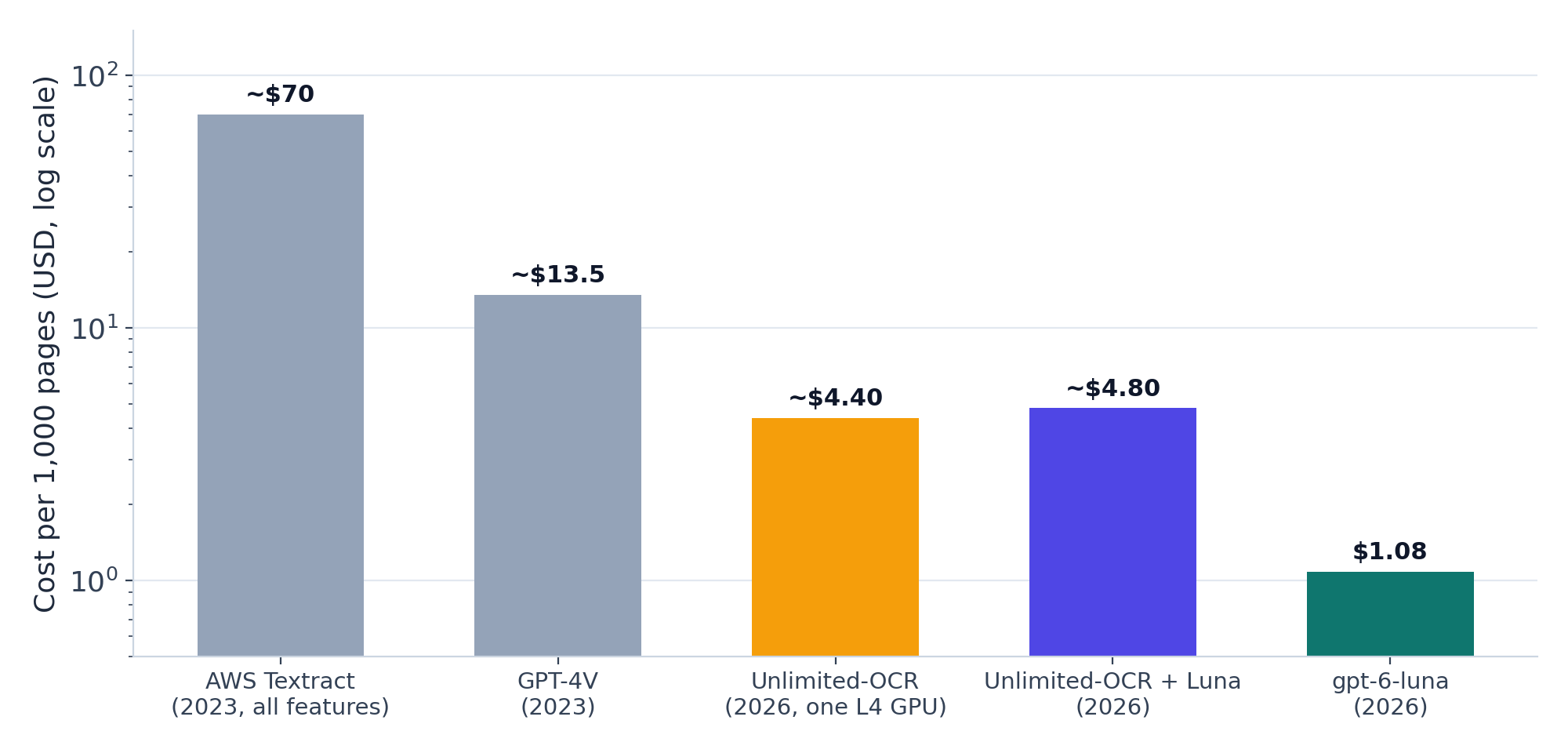 Cost per 1,000 pages from 2023 to 2026
2023 figures come from our GPT-4V vs AWS Textract test. The Textract bar is its all-features price (tables, forms and queries), which is still $70 per 1,000 pages on AWS's pricing page for the first million pages; plain text extraction alone is $1.50 and tables alone $15. 2026 figures come from this test: Luna's measured tokens at OpenAI's list price, and Unlimited-OCR at about 20 seconds a page on an NVIDIA L4 at $0.79 an hour.
| Set-up | Cost per 1,000 pages | 100,000 pages a month | What you pay for |
|---|---|---|---|
| gpt-6-luna alone | $1.08 ($0.54 with the Batch API) | $108 | API tokens only, nothing to run when idle |
| Unlimited-OCR alone | ~$4.40 | ~$440 | One L4 GPU, kept busy |
| Unlimited-OCR + Luna | ~$4.80 | ~$480 | The GPU plus $0.43 of Luna tokens per 1,000 pages |
The GPU figure is a best case because it assumes the GPU is busy all the time. An L4 left running around the clock costs about $575 a month whether pages arrive or not, and the API costs nothing while it waits. We also ran the OCR one page at a time, so batching would lower its cost per page, although it would need to fall by more than four times just to match Luna.
07 · LATENCY
Finding 5: Luna is faster on most pages, with one thing to guard against
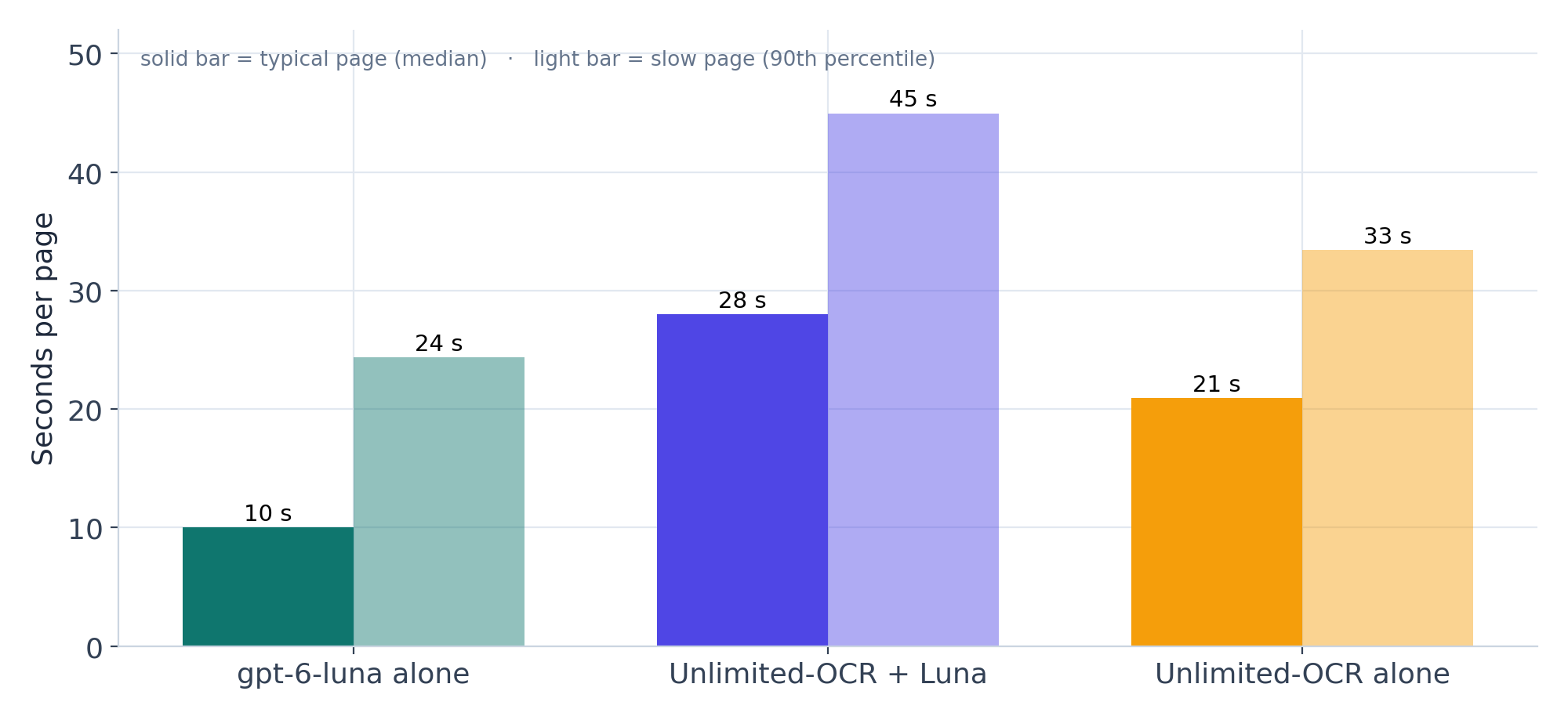
We timed every page in every set-up. Luna ran through OpenAI's API four pages at a time, and Unlimited-OCR ran one page at a time on a single L4.
 Seconds per page, typical and slow pages, for each set-up
A typical page took 10 seconds with Luna, 21 with Unlimited-OCR and 28 with both in sequence. One page in ten took longer than 24, 33 and 45 seconds respectively.
 Median seconds per page by document type
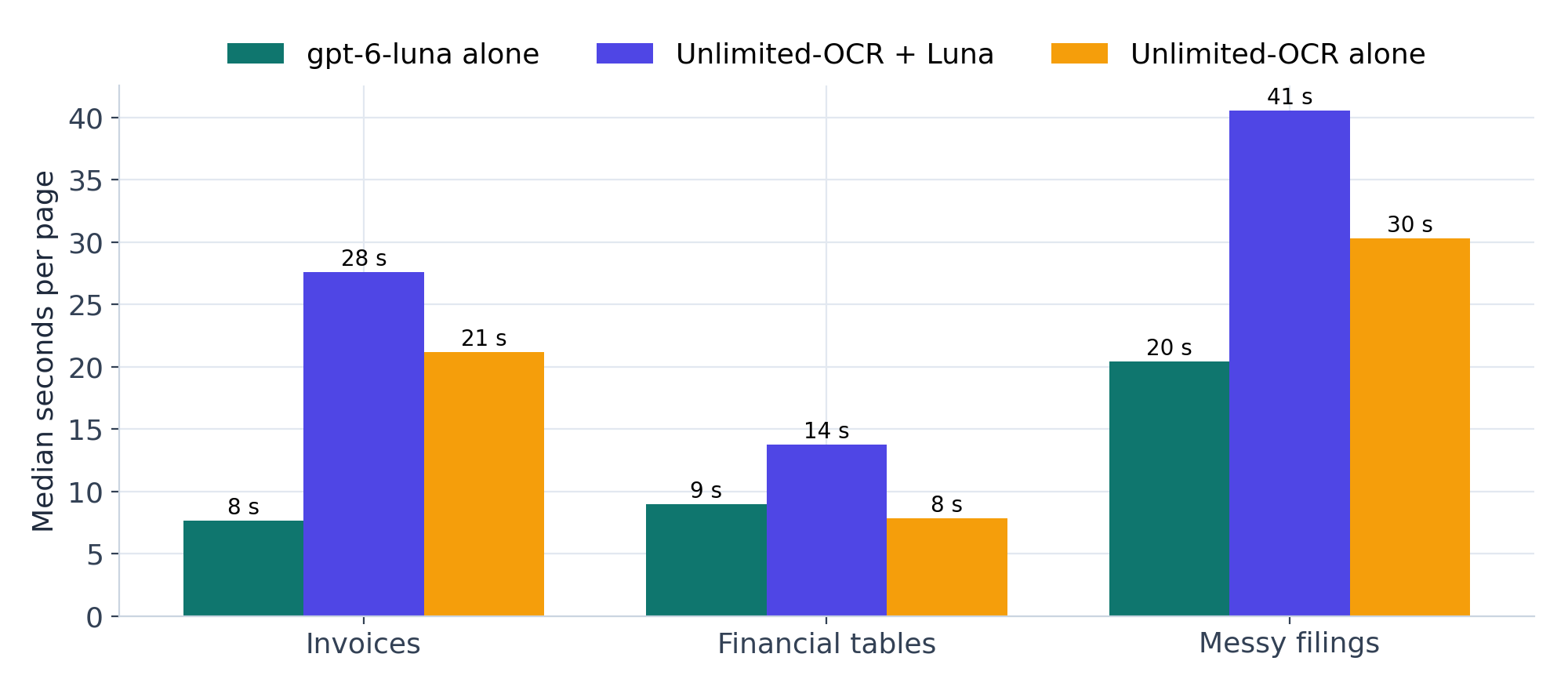
Unlimited-OCR was slightly quicker on short financial tables (8 seconds against Luna's 9) and much slower on invoices and long filings, where the page carries more text.
Speed depends on how much text is on the page. Long SEC filings took Luna about 20 seconds and the OCR engine about 30, and running both doubled the wait. One Luna page in our run sat for ten minutes because the connection stalled and the client waited for its default timeout, so in production we set a 90-second timeout and retry straight away, which turns a stalled request into a short delay.
08 · WHAT WE'D DEPLOY
Our recommendations
- Default to a cheap multimodal model reading the page image. On our documents it scored highest, passed the most pages, kept tables intact and cost about a dollar per thousand pages.
- Add two small guards. Tell the model to skip page headers, footers and page numbers, and re-run any page whose output looks too short for the page. Between them they target nearly every failure Luna had in this test.
- Set a timeout on every API call. A 90-second limit with an immediate retry keeps one stalled request from holding up a batch.
- Keep checking the numbers. Every set-up still made a handful of real data mistakes, so checks on totals, dates and table row counts stay worthwhile.
- Keep an OCR engine for pages that cannot leave your servers. Unlimited-OCR is open and runs on your own GPU, which makes it the right choice when documents are not allowed to reach an outside API, and it is excellent on invoices.
- Skip OCR + LLM clean-up as a default. It cost the most, took the longest and carried the OCR engine's broken tables straight through.
What we can and can't say
This test covers 300 pages across three document types, graded by two OpenAI judges. Small gaps are ties, and your documents may behave differently, which is the whole reason to test on them. Luna sends page images to OpenAI, which some clients will not allow, and model prices change often, so we've dated every cost in this post.
Conclusion
| The question has moved on from which OCR engine to use. For new document pipelines, start by asking whether you need a separate OCR step at all, then measure the answer on your own pages. |
|---|
In 2023 we wrote that if you were building new OCR capabilities, you should consider a multimodal LLM. Three years later the cheapest model in OpenAI's line-up beat the best open OCR engine we have tested, on the same pages and against the same answers, at a quarter of the cost. The OCR engine still has a clear job wherever documents have to stay inside your walls, and on simple invoices it is as good as anything else.
If you'd like to run this test on your own documents, that is what Gaugetuple is built for, and it is the platform behind every number in this post.
Happy parsing!
Sources: Newtuple Gaugetuple exports from October 14 and October 29, 2026; OpenAI API pricing and Lightning AI L4 GPU pricing, checked October 29, 2026; Amazon Textract pricing, checked November 1, 2026.
Download the aggregate benchmark data.