
A couple of weeks ago, a new startup called TypeSafe AI launched a model named Jev. The announcement drew a lot of attention. Some people saw it as a major change in how we use AI.
Now that the initial buzz has settled, we wanted to see what Jev could do with practical business tasks. We tried it on problems we had already worked on, including some we had tackled with generative AI agents. We also built a small playground so we could test new ideas quickly.
We tested document classification in financial services, product claim checks for retail, resume scoring, and email triage. This article shows what we tried, what we found, and what still needs testing.
What is TypeSafe Jev?
Jev is TypeSafe AI’s model for making focused decisions from information you provide. It returns a category, a yes-or-no probability, or a score that software can use. TypeSafe calls it a “System One” model. The name comes from Daniel Kahneman’s Thinking, Fast and Slow. System 1 describes quick, automatic thinking. System 2 describes slower, more deliberate thinking. This is an analogy for the work Jev aims to do, not a rule about what other models can do. TypeSafe explains the name in its launch post.
TypeSafe offers three question types:
- Choice: Pick one option from a list. For example, is an email about billing, support, or something else? Jev returns a choice, probabilities for the options, and a confidence value.
- Noul: Judge whether a statement is true. For example, does the customer ask for a refund? Jev returns the probability of “yes,” from 0 to 1. It does not return a separate confidence value.
- Score: Rate something against levels you define. For example, how urgent is a support request? Jev returns a score, probabilities across the levels, and a confidence value.
Speed could make this useful in a business workflow. TypeSafe reports response times of about 70 to 500 milliseconds in its tests, much faster than the LLMs it compared on those tasks. Our own tests support the impression that Jev is very fast. We tried it across a range of cases, and the responses were strikingly quick. These were not production-scale tests, so we cannot claim the same speed in a full workflow. Still, it is hard not to come away impressed.
The basic idea of using models to classify information is old. I worked on teams that put classifiers into production between 2015 and 2022. BERT, published in 2018, also showed how a pretrained language model could be adapted to many language tasks. Jev’s interesting difference is that we can define a new question and its possible answers for each request, then get a result without training a separate classifier for that task. That makes it easy to try focused decisions that we might otherwise give to an AI agent in a production system.
LLMs can also return structured answers. The format alone does not prove that Jev is better. It looks like a general-purpose decision model. My hunch is that it has learned from broad, real-world data, but that is only a guess. TypeSafe has not published enough about its training data to verify it. Our practical test is whether TypeSafe’s claims hold up and whether we can use Jev’s answers in our workflows.
How we tested Jev
For each test, our app read the source document or text and sent the useful content to Jev. We asked one or more Choice, Noul, or Score questions. The app then used Jev’s answers to classify a document, check a claim, score a resume, or triage an email. Our playground let us change the questions and try new examples quickly. The four use cases below show what we found.
1. Document classification in financial services
Task: Classify financial PDFs and workbooks before further processing. We tested Indian mutual fund disclosures and company announcements, U.S. SEC filings, and related financial documents.
Jev’s role: Choose the document category. For workbooks, first select useful sheets from previews. The app reads the files and prepares the text. Our work on financial PDF extraction covers that preparation step.
Initial finding: In our initial tests with 10 documents at a time, Jev assigned every document the expected category. Its classification responses took less than 400 ms. The files ranged from 50-page PDFs to large Excel workbooks with mutual fund portfolio statements and “skin in the game” disclosures. This was a standout result, and I came away impressed. Jev could be a useful agent router for document-heavy workflows in financial services.
Watch the document classification demo:
2. Claims matching and AEO readiness in retail
Task: Test whether Jev can check product claims for retail and manufacturing. We created a fictional supplier, Alder & Vale, with six products and marketing copy. We then tested 12 claim statements against the supplied product facts. This kind of check can support answer engine optimization (AEO), where claims in product copy and AI-generated answers need to match the evidence.
Jev’s role: Mark each claim as supported, overstated, contradicted, or unclear. The screenshots show three useful distinctions:
| Product | Claim checked | Jev’s result | Evidence in the supplied description |
|---|---|---|---|
| Ridge 750 bottle | 750 mL capacity | Supported | Explicitly states 750 mL. |
| Ridge 750 bottle | Dishwasher safe | Contradicted | Requires hand washing. |
| Metro 22 daypack | Sleeve fits laptops up to 15 inches | Supported | States that the sleeve was tested with laptops up to 15 inches. |
| Metro 22 daypack | Fully waterproof | Contradicted | Describes light-rain protection and explicitly says the bag is not waterproof. |
| Northpath jacket | Outer fabric has a 10,000 mm test rating | Supported | Gives that laboratory rating for the outer fabric. |
| Northpath jacket | Certified fluorine-free | Unclear | Says the supplier has not provided a certificate. |
Finding: Jev handled these claims well, including the edge cases. It accepted stated specifications, flagged direct contradictions, and marked the missing certification as unclear. We used both Jev’s category and its evidence-support score, which is based on its probability of “Supported,” to review each result. A retail or manufacturing team could use this check to correct copy or request proof before claims reach product pages or AI-generated answers.
Watch the AEO readiness demo:
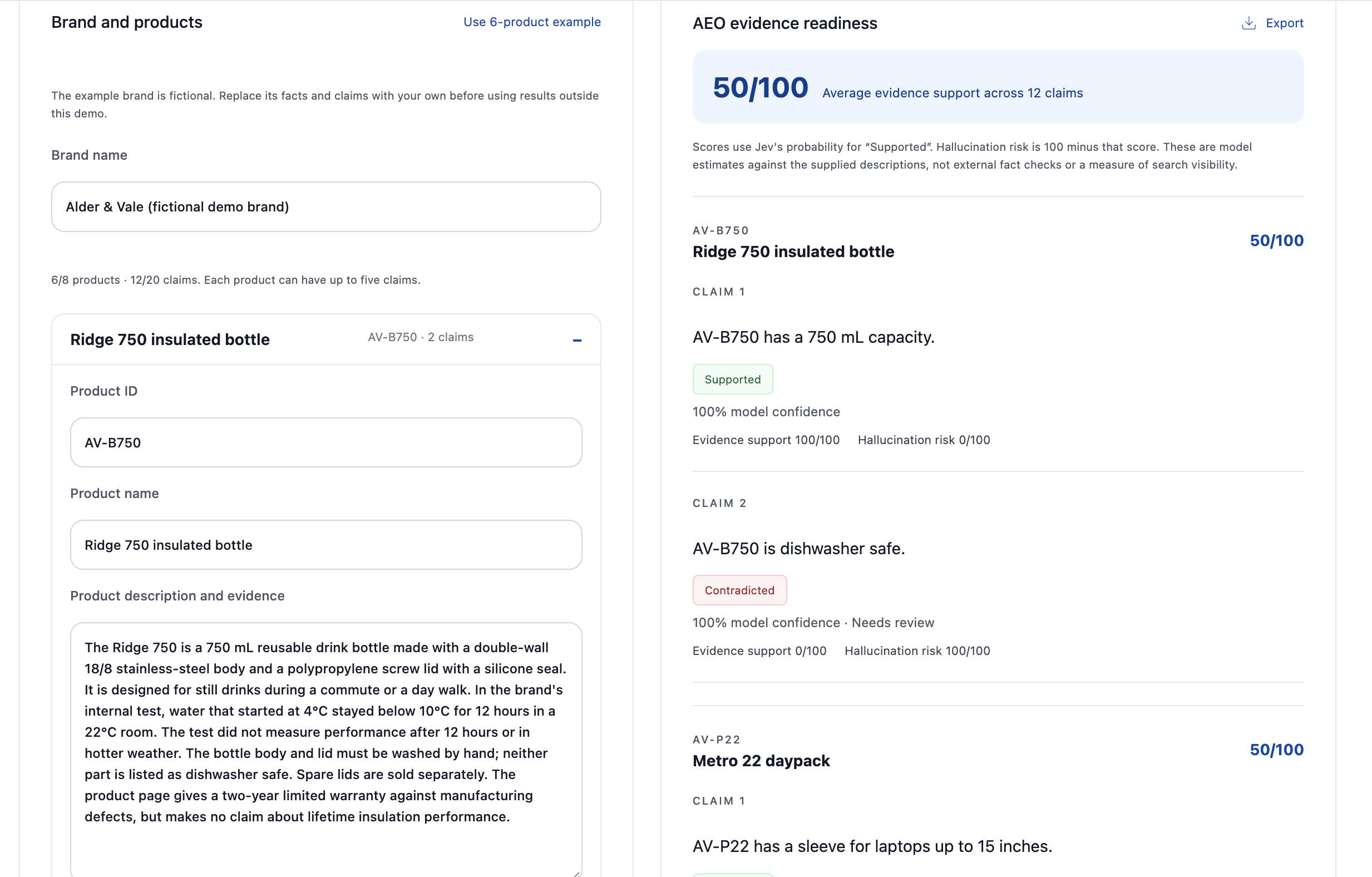 AEO evidence check for the fictional Alder & Vale brand: bottle capacity is supported and dishwasher safety is contradicted.
The overview shows 50/100 average evidence support across 12 claims. This is a claim-support score, not 50% classification accuracy.
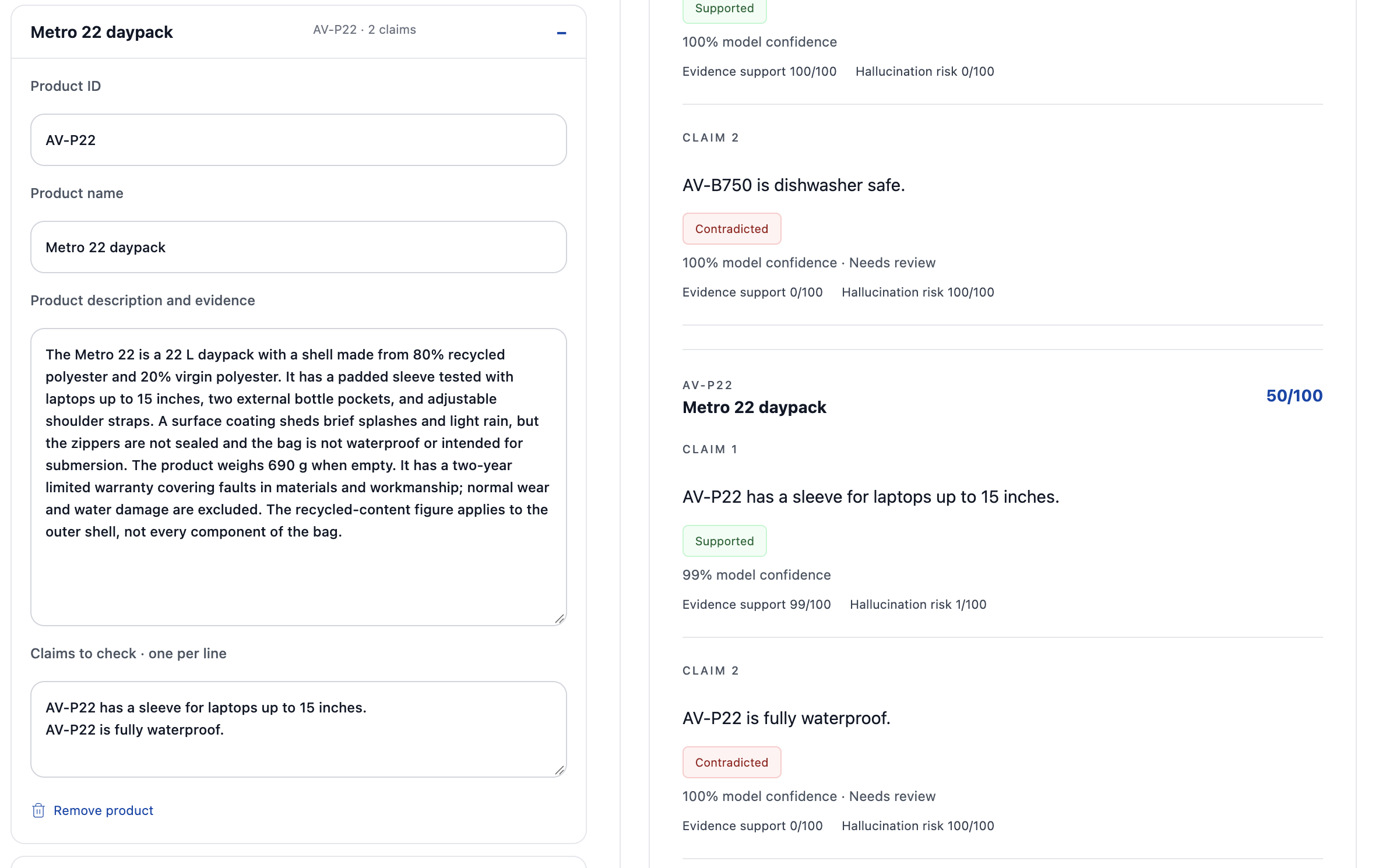 Metro 22 daypack: the laptop sleeve claim is supported; the waterproof claim is contradicted.
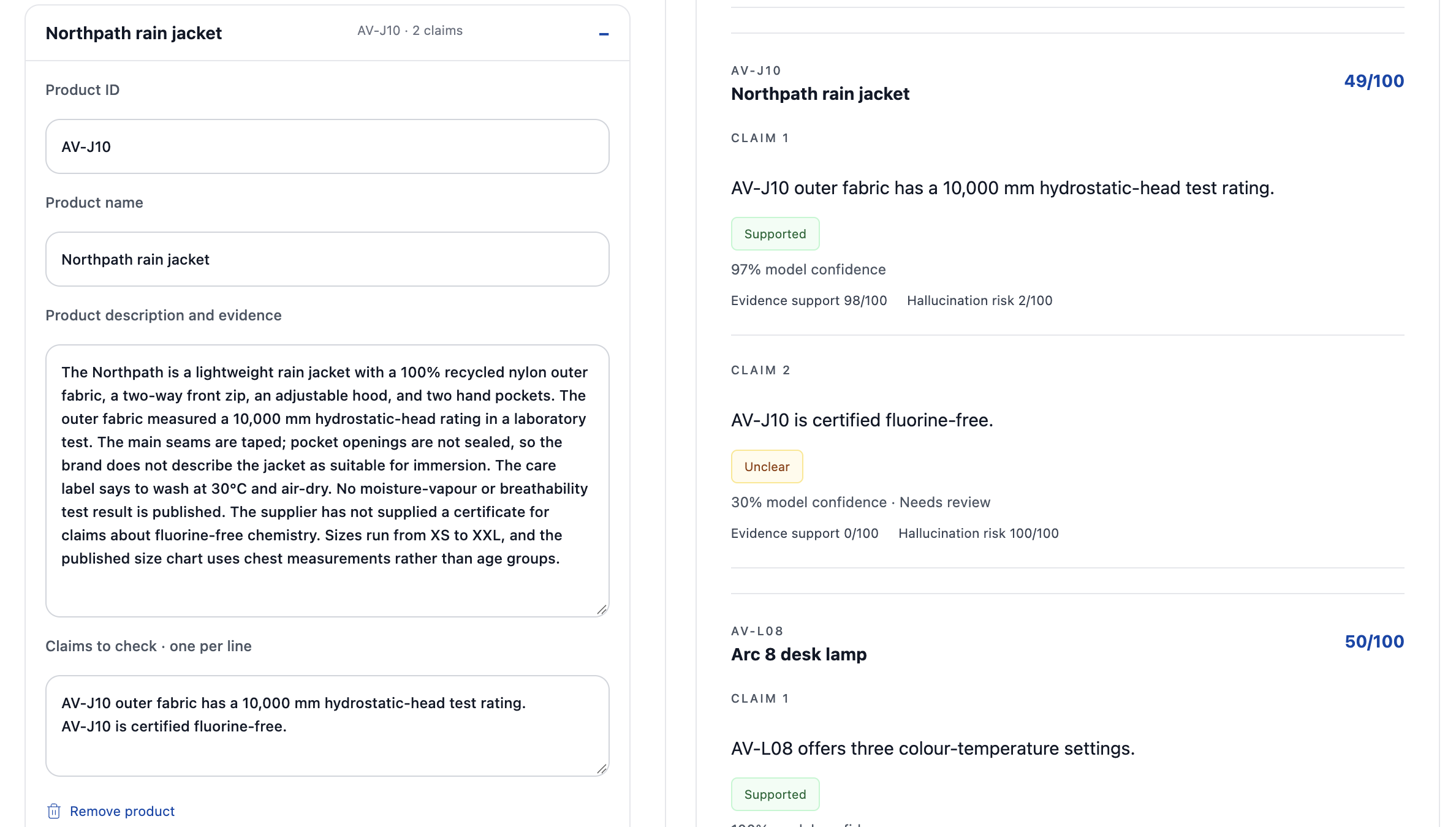 Northpath jacket: the fabric test rating is supported; certification is unclear because the supplier has not supplied a certificate.
3. Resume scoring for hiring teams and ATS workflows
Task: Compare stated resume experience with defined role requirements, such as API development, testing, and production reliability.
Approach: We tried a few methods before choosing Noul. For each job description, we wrote a different set of yes-or-no questions about its requirements. Noul returns a probability for each “yes” answer. The app uses those results to calculate a weighted resume score.
Finding: This approach worked well and gave us answers almost instantly. Jev stood out here. It also showed how Noul could help with other document reviews that need a series of clear, focused questions.
I tested my own resume against two roles. Jev gave me a humbling 3/100 for Frontend Engineer and a much friendlier 69/100 for Business Analyst. Clearly, I should leave the frontend designs to someone else. My team will testify to that. The gap makes sense: my resume shows requirements work, but little direct evidence of frontend engineering. Each role had its own questions and weights.
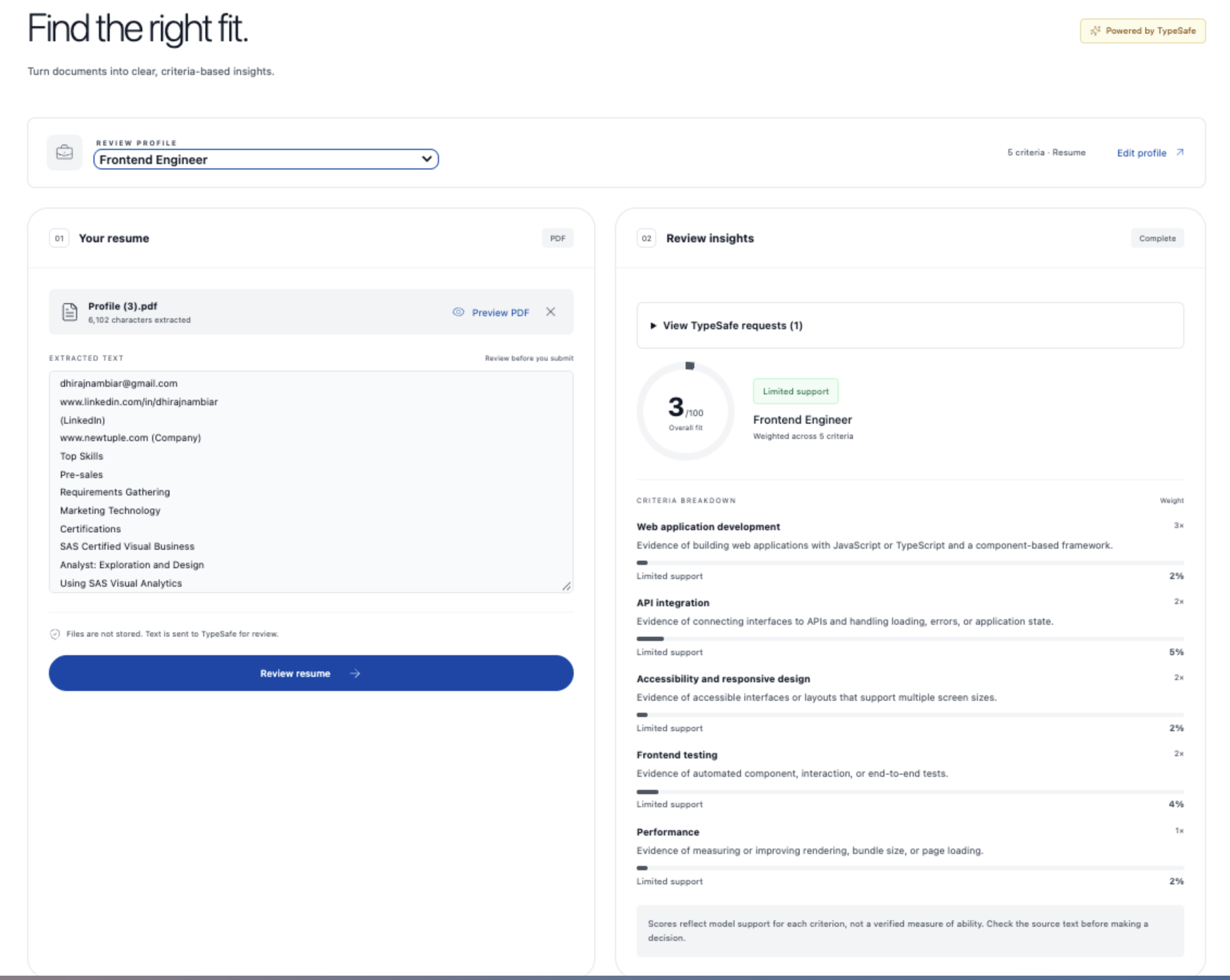 My resume scored 3 out of 100 for the Frontend Engineer role across five criteria.
My resume had little evidence for the Frontend Engineer criteria.
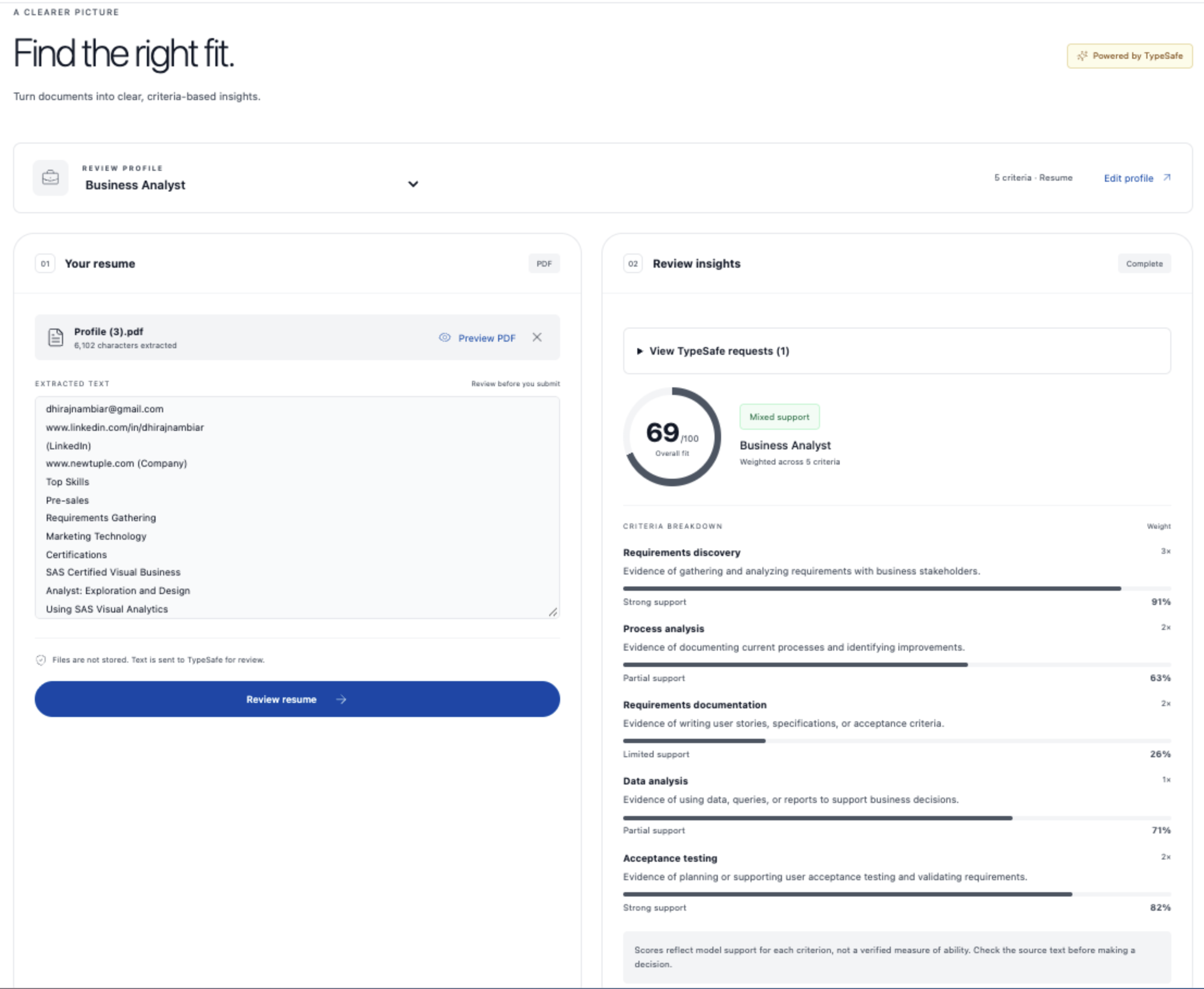 The same resume scored 69 out of 100 for the Business Analyst role across five criteria.
The same resume scored higher for the Business Analyst criteria, including requirements discovery.
Jev is another viable option for understanding documents in context within agent workflows.
4. Email classification for customer operations
Task: Identify an email’s purpose, suggested team, urgency, and need for a reply.
Jev’s role: Answer four focused questions in one pass: What kind of email is this? Which team should handle it? How urgent is it? Does it need a reply?
Finding: We tried two sample emails. Jev labeled a damaged coffee maker message as a complaint and routed it to Support. It labeled a duplicate charge as billing and routed it to Finance. Both emails were marked as normal urgency and needing a reply. The same four questions handled two different requests, which makes triage a useful Jev step before an agent checks the details or drafts a response.
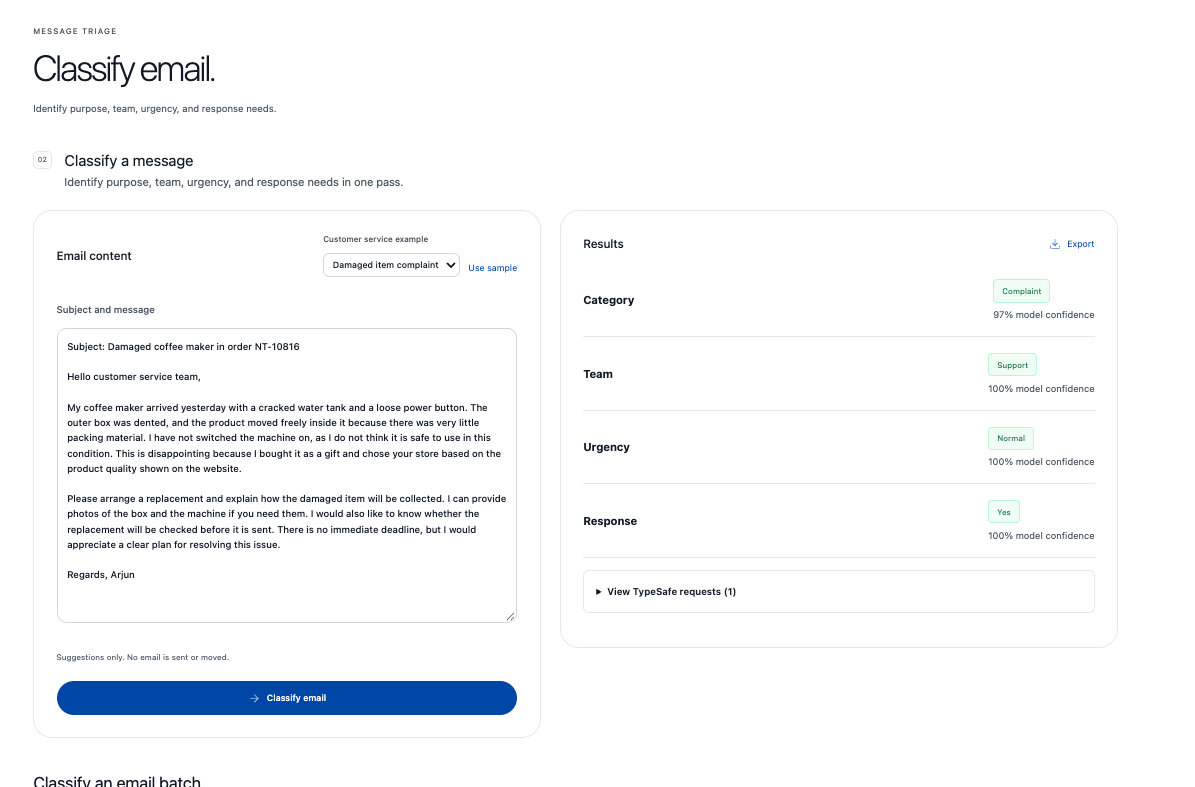 Email triage for a damaged coffee maker: Complaint, Support, normal urgency, and a reply needed.
The damaged product complaint goes to Support.
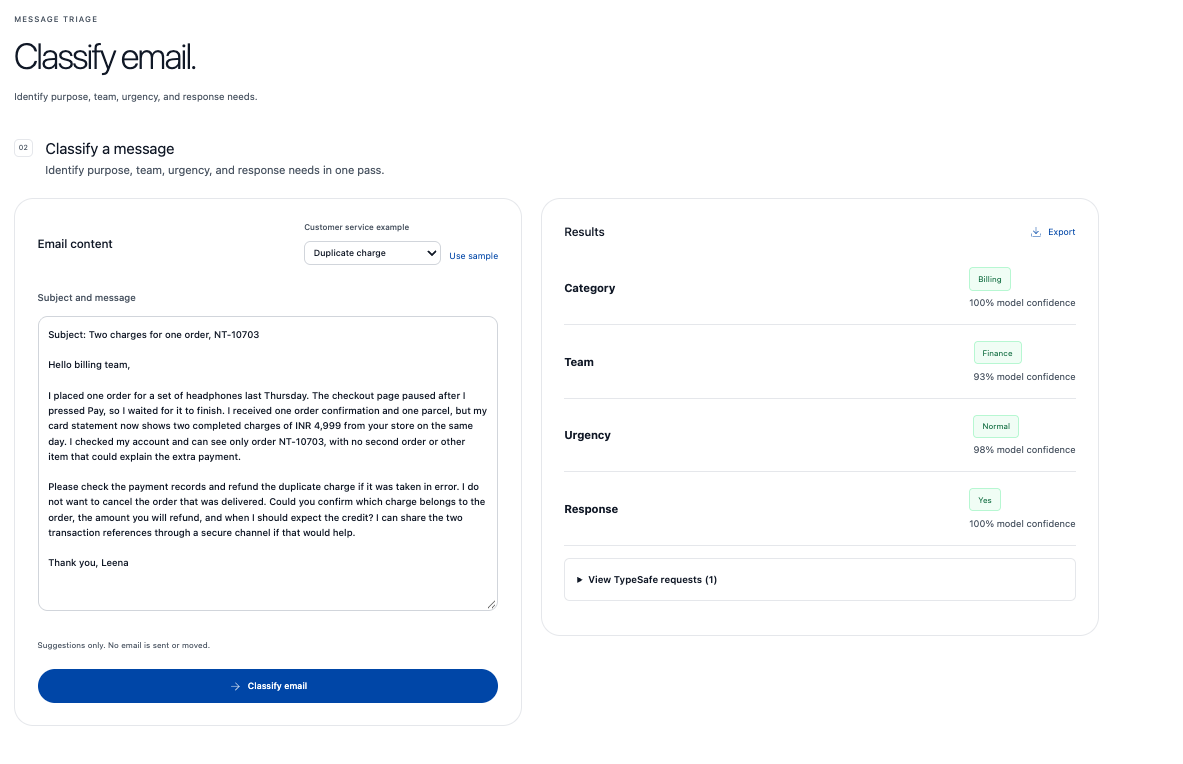 Email triage for a duplicate charge: Billing, Finance, normal urgency, and a reply needed.
The duplicate charge request goes to Finance.
So can Jev replace the LLMs in your agentic workflow completely? Not yet
These experiments show that Jev is an exciting area for further exploration. Its speed and low cost could make new use cases practical. Jev seems well suited to routing, classification, and other focused decisions. I would be more careful with tasks that need judgment and taste. That feels odd to say when LLMs already do work we once thought required human judgment and taste.
So here’s my takeaway: specific steps inside agents and workflows can benefit from Jev. Useful places to start include:
- Document classification and workbook sheet selection
- Email triage
- Checks against supplied product facts
Each task asks a defined question and produces an answer that code can act on.
Other tasks still need the more deliberate, System 2-like parts of the process:
- Investigating conflicting evidence
- Planning several steps or resolving an unusual customer case
- Producing an explanation
Replacing that whole process with a fixed-choice answer would not make sense. LLMs, agents, retrieval tools, and human review still have roles there. File handling and exact calculations remain software tasks.
Start with one repeated decision. Test whether Jev can handle it, and keep the surrounding tools. Evaluations are critical to this work. If your team does not have an evaluation strategy, now is the time to build one. Models like Jev create new options, and evaluations show which ones work in your setting.
Why your AI architecture needs another look
For me, the lesson is to keep the architecture modular. A workflow might read a financial filing, classify it, extract values, and write a summary. Those are separate jobs. If Jev works better for classification, you should be able to change that one step while the rest of the workflow stays in place. The same goes for claim checks and email triage.
Evaluations tell you when to make that change. We have seen this in other model swaps. For document routing, keep a set of reviewed files with the correct categories. For retail claims, include examples that are supported, contradicted, and unclear. Run the same cases through Jev and your current model. Compare the answers, response time, cost, and cases that need review. Repeat the test when you change a question, model, or threshold.
That is what makes a new model useful in practice: you have a step you can replace and evidence that shows whether the change helped. Contact us about a discovery workshop if you want to examine your own workflow. We can map its decision steps and build the evaluations to test them.
You can also request access to the playground and test your own use cases with us.